AI comments for Telegram posts
Deskgram 2 can monitor new channel posts and prepare AI comments for their discussion groups. Choose channels, accounts, a model and the context used for each response.
AI comments for Telegram posts
Deskgram 2 can monitor new channel posts and prepare AI comments for their discussion groups. Choose channels, accounts, a model and the context used for each response.
Download Deskgram 2 Explore the interface Plans GuideModule settings
Configure the channel list, comment mode, AI provider, model and prompt. Set reply limits and pauses. Comments require an available discussion group and an account that can write there. Check model access and external API costs before starting.
Example: a comment on a new post in your own channel
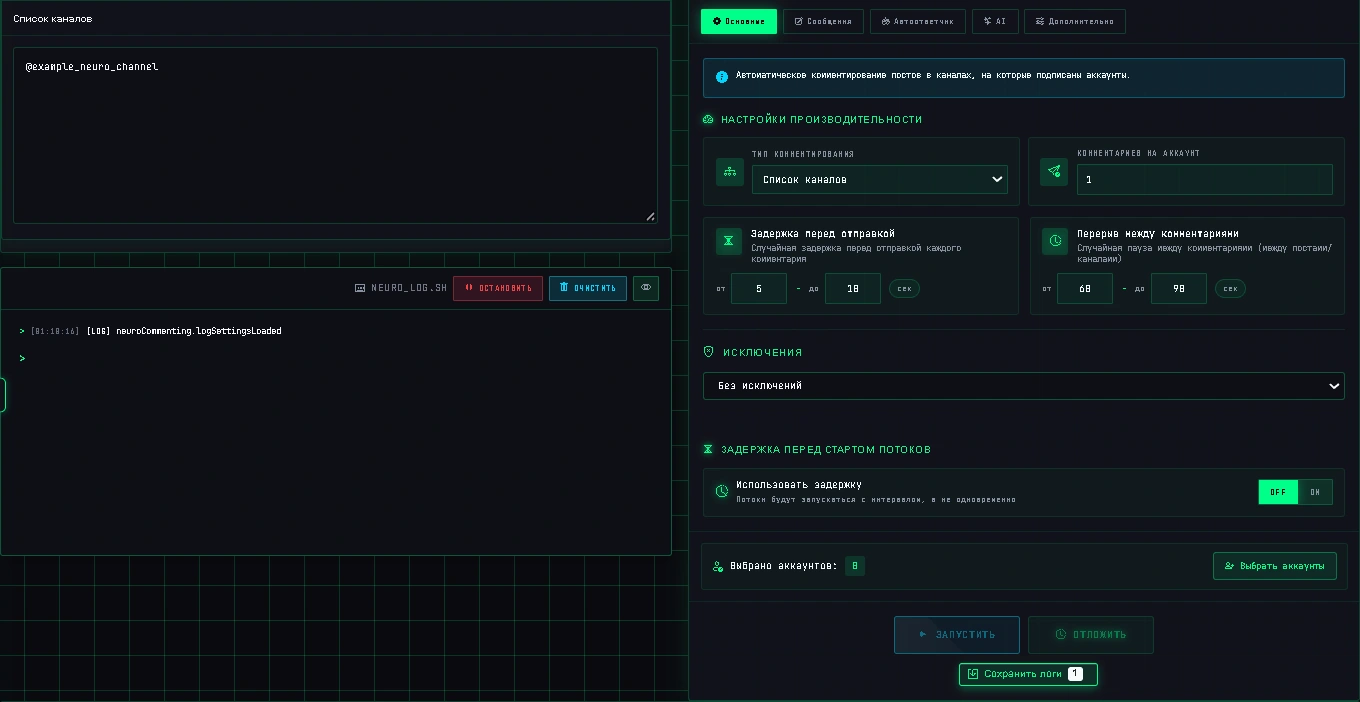
Use your own test channel with a linked discussion group. Subscribe one of your accounts in advance and check that it can post a comment manually. The example uses @example_neuro_channel as a placeholder; replace it with your channel address.
Under Main settings, choose the channel-list mode and enter the address in the left field. Set 1 comment per account, a 5–10 second delay before sending and a 60–90 second interval between comments. These are example settings, not safe Telegram limits. No accounts are selected in the screenshot and the task has not started.
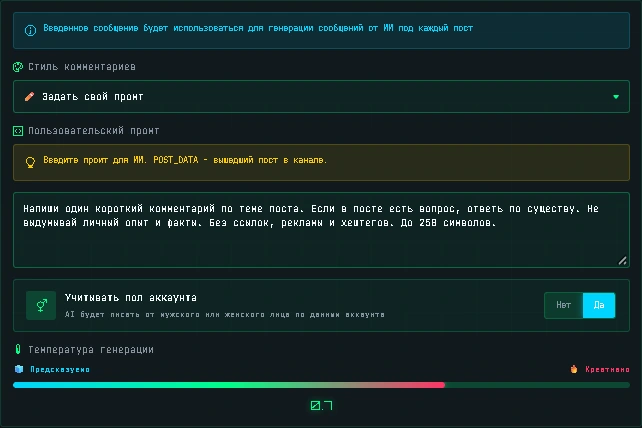
On the AI tab, enable generation and choose a provider and model available to you. For an external provider, check its key and balance in the installed app. Paid models follow the provider’s rates; free-model availability depends on the service. Under Comment style, choose the custom-prompt option and paste the text below. The new post text is passed to the model separately; you do not need to insert it in the prompt.
Example prompt: “Write one short comment about the post. If it contains a question, give a relevant answer. Do not invent personal experience or facts. No links, advertising or hashtags. Up to 250 characters.”. The length is an instruction to the model; check the generated text yourself.
For the first check, leave rewriting, the autoresponder and automatic discussion joining off. In the installed app, select the prepared account, start the task, then publish a new test post in your own channel. For example: “Support hours are now 10:00–18:00. Which questions should we add to the FAQ?” The module watches new posts; this example is not for processing the channel archive.
Open that post’s discussion and compare the comment with the task log. Check relevance, invented facts, links and duplicates. If something fails, inspect discussion access, the AI provider response and the Telegram error before retrying. A running task alone does not confirm publication. This example only shows preparation in the web preview: no comments were sent and no AI requests were made.
Check before running
Test a channel you control: publish a new post, inspect the comment and compare it with the source text. Check relevance, facts, links and repeated replies. AI quality depends on the model and context. Telegram restrictions remain in effect; settings do not guarantee delivery or prevent account blocks.
Related tasks and guides
Choose a related task or open the detailed guide. Linked Russian guides are marked accordingly.
Guide Download Deskgram 2 AI conversations in Telegram groups Telegram autoresponder Guide Compare software Home