Telegram software for promotion and automation — Deskgram 2
Deskgram 2 is Telegram software for Windows and macOS: messaging, audience parsing, inviting, account management and AI modules. Explore the interface and download the app.
DESKGRAM 2
Messaging, audience parsing, inviting and account management in one app for Windows and macOS.
No commitment. A free plan stays after the 3 days.
SOFTWARE COMPARISONInvites
Automatic search and attraction of target audience to your channels and groups
Telegram inviting softwareMessaging
Send messages to chats and DMs with configurable text, pauses and task settings.
Telegram group messaging softwareParsing
Collect members of accessible chats and comment authors within Telegram access permissions
Telegram audience parserAccount settings
Proxies, pauses and task settings to control activity. Protection from bans is not guaranteed.
Many accounts
Manage multiple accounts and their tasks from one interface
AI modules
Comments and chats written by AI from the post itself, not from one template.
AI comments for Telegram postsMore Deskgram 2 modules
Choose a related task or open the detailed guide. Linked Russian guides are marked accordingly.
Telegram autoresponder Branching Telegram autoresponder AI conversations in Telegram groups Telegram channel posting through a botSee how tasks work in Deskgram 2
Deskgram 2 is Telegram software for Windows and macOS, with accounts, messaging, parsing, schedules and AI modules in one interface. The download page does not offer a Linux installer. Deskgram examples checked on 2026-10-27. Screenshots show the Russian interface and sample settings; no messages or AI requests were sent.
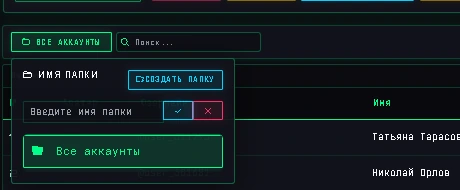
Custom account folders
Create folders for projects and select the accounts you need. The manager also provides search, filters and proxy assignment.
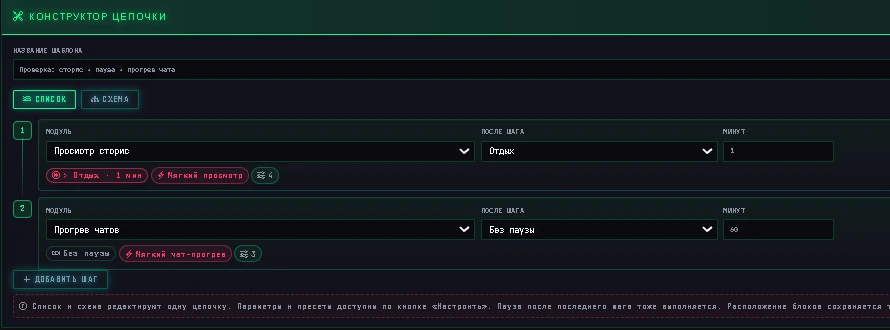
Task chains with pauses
Choose steps and pauses between them. This example uses story viewing, a one-minute rest and chat warm-up. Configure each step separately.
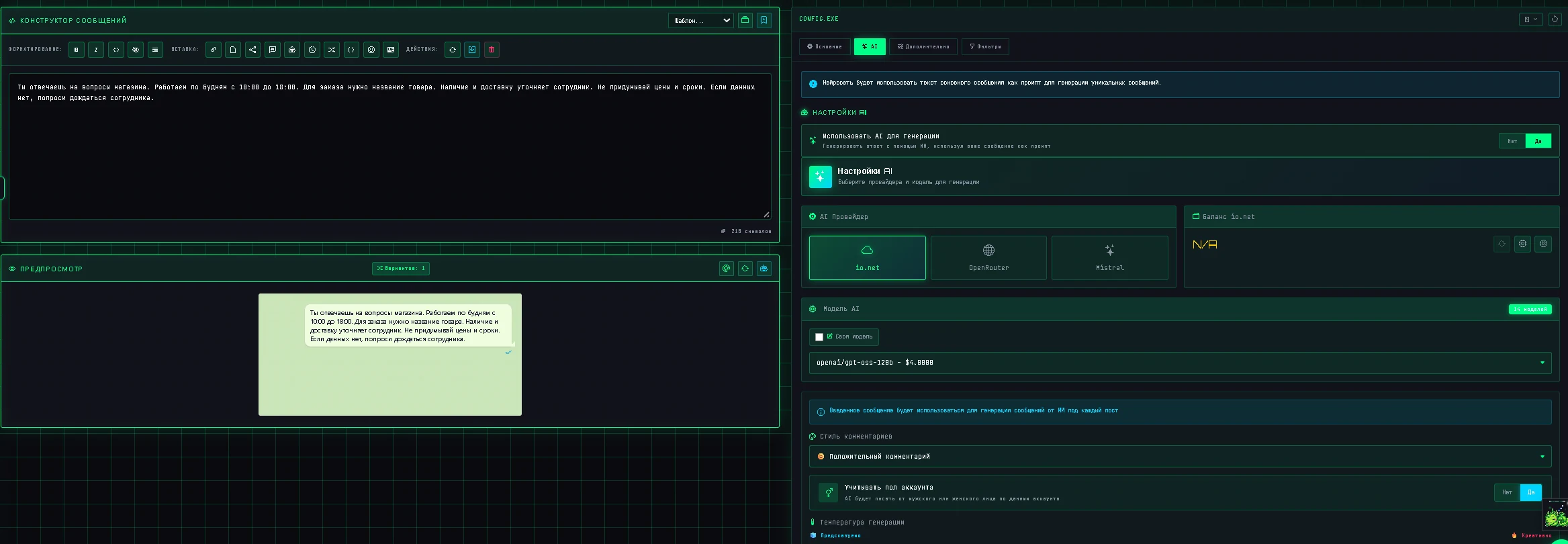
AI replies to incoming messages
Connect a model and describe your store's terms in the prompt. Set run time, reply counts, exclusions and conversation context in the autoresponder.
What the price covers
The full subscription includes every module. Accounts, proxies, Telegram Premium and external AI requests cost extra. Check your plan and Windows/macOS requirements before buying.
Plans Downloads and requirements Explore the interface Audience parsing Connect an AI agent through MCPWhat is Deskgram 2?
Deskgram 2 is Telegram software for Windows and macOS. It lets you work with multiple accounts, collect audiences, send messages, invite users to groups, configure autoresponders and publish to channels. AI modules are available for specific tasks.
How does Deskgram 2 differ from competitors?
Deskgram 2 combines messaging, parsing, inviting, account management and AI modules in an app for Windows and macOS. Compare the features, platforms, licence terms and current prices for the same period. Explore relevant workflows in the demo and guides: https://deskgram2.com/guides
Compare Telegram softwareWhat OS does Deskgram 2 run on?
Versions are available for Windows and macOS. See the download page for current installers, supported platforms and requirements. Resources for concurrent tasks depend on accounts, modules and workload: https://deskgram2.com/en/download
Installers and requirementsHow to get started with Deskgram 2?
Start with the web preview and the guide for your chosen module. Download the installer for your OS, launch the launcher and sign in to Deskgram 2. Check the access terms, add a Telegram account and run a small test task. Review the results and error log before increasing the workload.
Find a module guideIs there a free version of Deskgram 2?
Explore the interface without installation in the web preview. Find the app and trial terms on the download page and current plans in the pricing section: https://deskgram2.com/download
Explore the interfaceHow much does Deskgram 2 cost?
Current plans and subscription periods are shown in the homepage pricing section and at checkout. Check the price, duration and included features before payment. Compare software prices for the same period and licence conditions.
View plansDo AI requests cost extra?
For AI tasks, select a provider and model in the app settings. Depending on the service, you may need an API key, and requests may be billed separately from your Deskgram 2 subscription. Check the provider’s pricing, balance and limits before starting. Tasks without AI do not require a model.
AI setup guide (Russian)Is it safe to use Deskgram 2?
Deskgram 2 automates actions of your Telegram accounts. Security depends on session access, proxies, task settings and user actions. Protect session files and review settings before running tasks. Automation does not override Telegram restrictions or guarantee freedom from bans. Data processing policy: https://deskgram2.com/privacy