Managing Telegram Accounts in Deskgram 2
The account panel is the control center for every Telegram workflow in Deskgram 2. Before you launch inviting, parsing, direct messages, story views or AI comments, you should know how to prepare and maintain the accounts that will do the work.
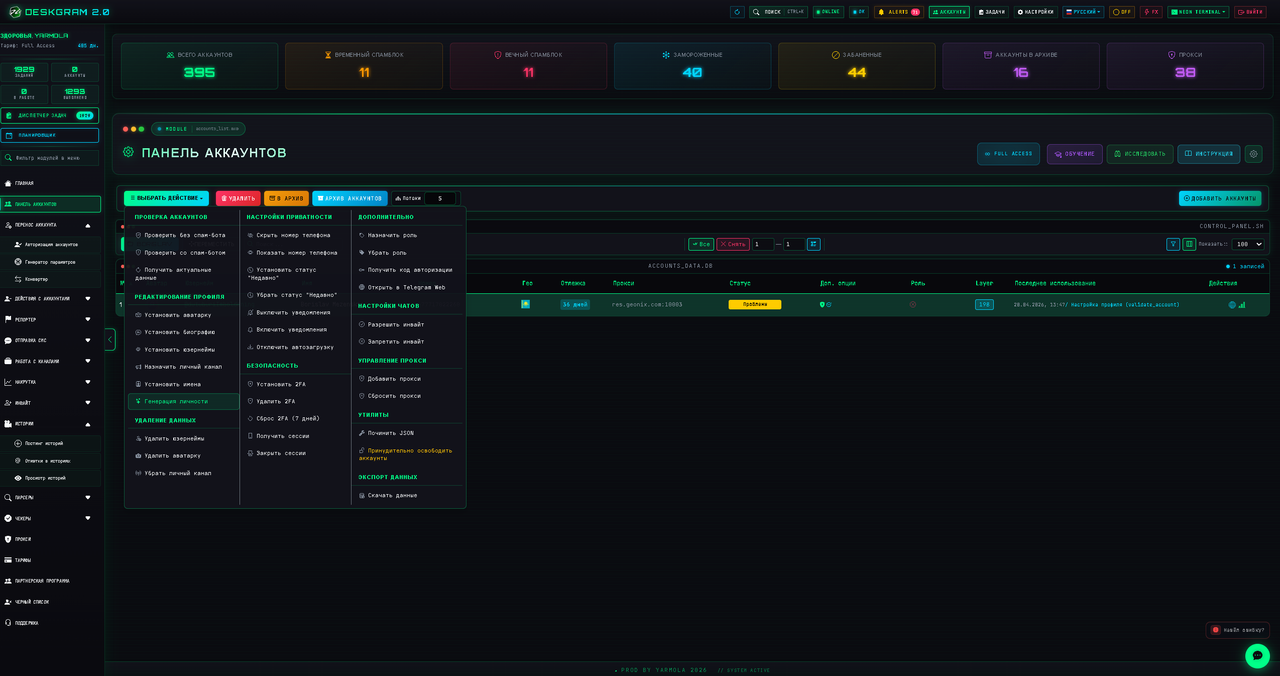
What the account panel is for
Use this section when you need to organize a Telegram account farm and keep it predictable. From one place you can check account status, update profiles, bind proxies, set 2FA, export data and prepare accounts for safer automation.
The main idea is simple: do not treat accounts as anonymous rows in a table. Each account needs a profile, a stable proxy, realistic activity and clean technical settings before it starts touching real users.
Key actions
- Profile editing: update name, username, avatar, bio and other visible account details.
- Proxy binding: attach a proxy to an account so Telegram sessions do not constantly change network identity.
- 2FA management: add or update two-factor authentication where it is needed.
- Validation: check whether accounts are alive, authorized and ready for a specific module.
- Bulk operations: apply the same action to selected accounts instead of editing each account manually.
Recommended workflow
- Import or add accounts to Deskgram 2.
- Check authorization status and remove broken sessions.
- Bind proxies before active work.
- Fill profile data so accounts do not look empty.
- Warm up accounts with low-risk activity.
- Only then launch messaging, inviting, parsing or AI-commenting tasks.
Why this matters for Telegram automation
Most problems in Telegram automation do not start inside the module itself. They start earlier: weak accounts, unstable proxies, empty profiles, mixed sessions or aggressive limits. A clean account panel reduces those risks before the campaign begins.
For scaling, split accounts into groups by role. For example, keep separate pools for parsing, warmup, direct messaging, AI comments and tests. This makes it easier to understand which accounts perform well and which ones should be paused.
Practical checklist
- Do not run fresh accounts at full speed.
- Do not use one proxy for too many unrelated accounts.
- Do not mix test accounts with production accounts.
- Keep notes about risky accounts and replace them before large campaigns.
- Use account groups to separate traffic sources, niches and modules.
Summary
The account panel is not just a storage table. It is the safety layer for the whole Telegram automation setup. If accounts are clean, warmed up and correctly assigned, Deskgram 2 modules become easier to control and scale.