Task Manager in Telegram Automation: Why It Matters for Scaling
When Telegram automation runs on one account and one simple task, you can still keep the process in your head. But once you add dozens of accounts, multiple modules, separate audience pools, warm-up, messaging, parsing, and AI-driven scenarios, the workflow turns into chaos without a task manager.
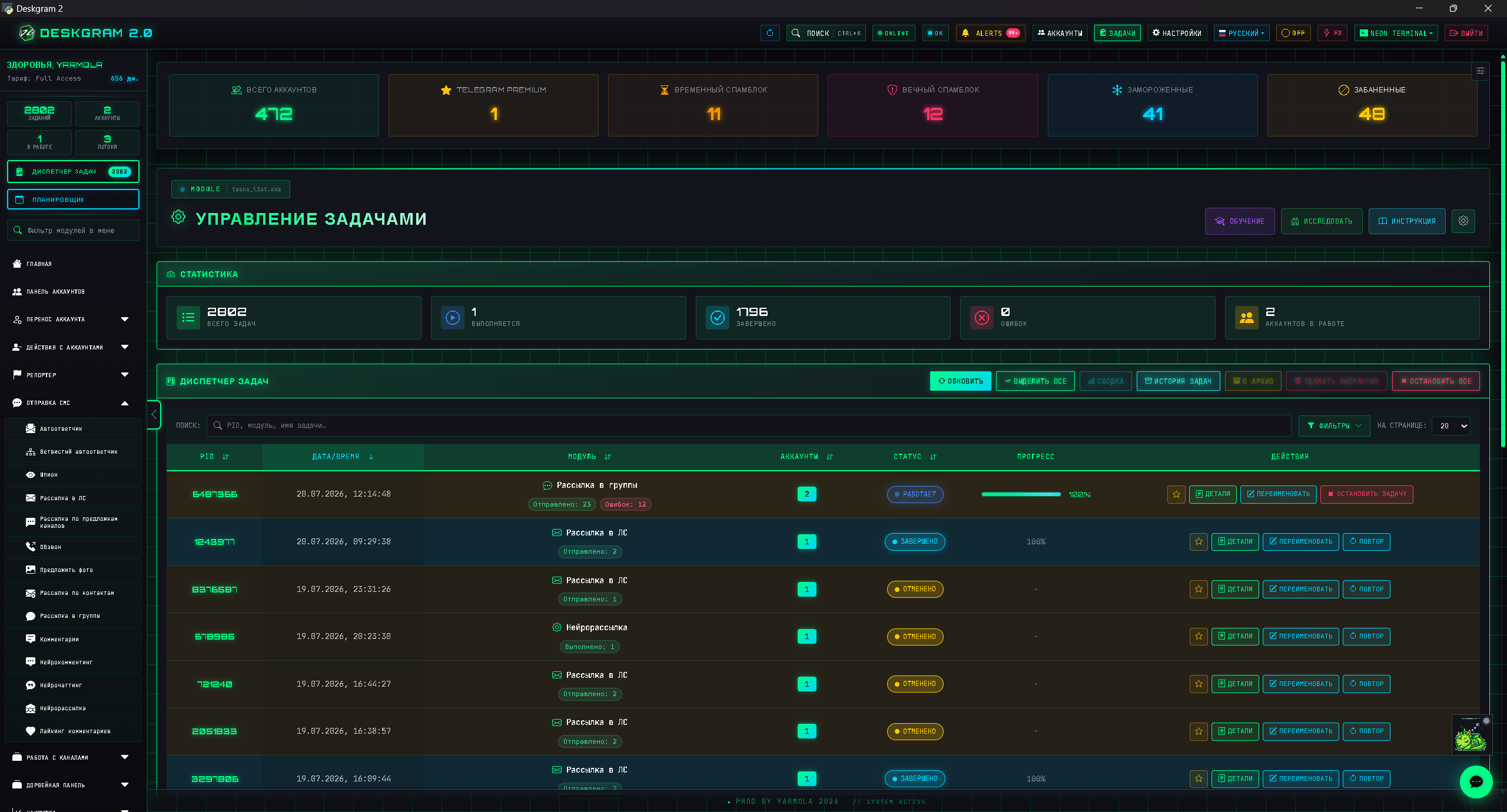
A task manager helps you see what is running, where errors appeared, which accounts are active, which tasks finished successfully, and which ones should be stopped or repeated.
What a task actually is
A task is a concrete module launch with parameters: which accounts are involved, which audience is used, what limits are configured, when the run started, and how it ended.
Examples of tasks:
- collecting an audience from a chat;
- sending direct messages to a segment;
- warming up a group of accounts;
- searching channels by keywords;
- running neuro-commenting on selected sources;
- inviting users into a chat;
- validating an audience.
If tasks are not recorded, it becomes hard to understand later what actually produced a result or an error.
Why the task manager matters
The task manager is about operational control. It helps you avoid running everything manually and getting lost in parallel execution.
Core functions:
- seeing the list of active tasks;
- tracking statuses;
- reviewing errors;
- stopping problematic launches;
- planning repeated actions;
- separating tasks by module;
- analyzing outcomes.
This is critical for scaling. Without a task manager, the team starts working from memory and intuition: “it seems the campaign ran,” “the accounts were probably warmed up,” “there were some errors somewhere.”
Why logs matter
Logs are not a minor technical detail. They are a diagnostic tool. They show where the bundle breaks: accounts, proxies, audience, limits, module settings, or an external factor.
Useful things to inspect:
- repeated error patterns;
- accounts with recurring failures;
- sources where many tasks break;
- execution time;
- stopped tasks;
- reaction to different limit settings.
If you never look at logs, you can keep scaling a scenario that is already showing clear signs of failure.
How to plan tasks
Planning helps you avoid overloading accounts and mixing too many active scenarios at the same time.
A healthy sequence:
- Prepare accounts and proxies.
- Launch warm-up.
- Check stability.
- Run a small test.
- Review logs.
- Scale only the workflows that proved stable.
The scheduler becomes especially useful when tasks should run not immediately, but on a schedule or in a specific order.
How to analyze task outcomes
After a task finishes, it is not enough to see a “done” status. You need to understand whether the task was successful from both an infrastructure and business perspective.
Look at:
- how many actions were completed;
- how many account errors happened;
- which accounts dropped out;
- which sources performed best;
- which limits were too aggressive;
- whether there were replies or reactions;
- whether the scenario should be repeated.
For example, a messaging campaign may complete technically but still generate a lot of negative replies. That is not a successful task. It is a signal to rethink the audience or the copy.
A sample task chain
For a Telegram product growth workflow, you can build the following sequence:
- Search channels and groups by keywords.
- Find similar channels from strong sources.
- Collect users from selected chats.
- Validate and segment the audience.
- Warm up accounts.
- Run a small direct messaging test.
- Enable an autoresponder for inbound replies.
- Review logs and scale.
When each step exists as a separate task, the team can see the whole chain and improve it step by step.
Common scaling mistakes
The first mistake is launching too many modules at the same time without understanding total load.
The second mistake is skipping the difference between testing and scaling. If a small run was not validated, a large run only multiplies the same issue.
The third mistake is ignoring stopped or failed tasks. Those tasks reveal the weak points of the system.
The fourth mistake is not recording parameters. Without them, a successful scenario cannot be repeated reliably.
Mini FAQ
Is a task manager useful only for large teams?
No. It becomes useful as soon as you have several accounts, several modules, and more than one test. The earlier structure appears, the easier scaling becomes.
What matters more: task status or logs?
Status shows the top-level result. Logs explain why it happened. For diagnosis, both are required.
Can several tasks run in parallel?
Yes, if you understand the shared load on accounts and proxies. Without control, parallel tasks quickly begin to interfere with each other.
How tasks connect to growth hypotheses
The task manager is not only a technical tool. It also helps validate marketing hypotheses. For example, you may want to compare which audience responds better: channel owners, SMM specialists, or users from chats about Telegram Ads.
Instead of mixing everything into one run, create separate tasks:
- messaging to the channel-owner segment;
- messaging to the SMM segment;
- messaging to the Telegram Ads segment;
- a separate autoresponder or label for each test.
Then you can compare not just technical statuses, but the quality of responses. In that sense, the task manager becomes part of growth analytics: it shows which segments, texts, and sources produce real signal.
How to keep order over long campaigns
If a campaign lasts several weeks, chaos grows gradually. At first there are few tasks, then new audiences, accounts, copy variants, retries, stops, and edits begin to pile up. To stay in control, the team should agree on a few rules in advance:
- do not run large tasks without a test;
- give tasks clear names;
- record the copy version;
- save the audience segment;
- review errors before retrying;
- do not scale a task just because it “finished.”
These rules are simple, but they are exactly what turns automation from a bunch of launches into a system.
A practical pre-scaling checklist
Before increasing task volume, run a short check:
- The test task finished without critical errors.
- Accounts did not show mass recurring failures.
- Proxies did not become the bottleneck.
- The audience was clear by source and segment.
- The copy or scenario produced normal reactions.
- The autoresponder is ready to handle inbound messages.
- The task has a clear name and saved parameters.
If even one of these points is missing, scaling should wait. Otherwise you are scaling an unresolved problem rather than a proven workflow.
The team coordination role
The task manager also helps distribute work between people. One person can prepare audiences, another can monitor accounts, and a third can analyze replies. When tasks are named and structured, the team no longer argues about what was launched and why the result looked the way it did.
Where Deskgram 2 helps
In Deskgram 2, the task dashboard and scheduler help manage modules as one system. This is especially important when accounts, proxies, parsers, messaging, warm-up, and AI modules run in parallel.
Useful web previews:
Why task control helps safety
Task control is also a safety layer. When account warming, proxy rotation, Telegram API limits and audience quality are tracked inside named tasks, the team can see which part of the workflow created the problem.
For bulk messaging safety, avoid anonymous launches like "test 2" or "new spam". Use task names that include the source, segment, account group and goal. That makes later analysis much easier and prevents the same failed pattern from being repeated.
Conclusion
A task manager becomes necessary when Telegram automation turns into a system rather than a collection of manual launches. It helps you see processes, control errors, repeat successful scenarios, and stop weak ones in time.
If you want to scale promotion without chaos, tasks, logs, and statuses should be treated as the same critical layer as accounts, proxies, and audience data.