Proxies for Telegram Automation: What Matters Before You Launch
Proxies in Telegram automation are often treated like a minor technical detail: upload a list, bind them to accounts, and forget about them. In practice, proxies are one of the main stability layers. If that layer is chaotic, problems start showing up everywhere: login, warm-up, direct messaging, invites, comments, and scheduled tasks.
Proxies do not solve every risk on their own. They work together with account quality, limits, warm-up, audience quality, and your scenario. But without a stable network layer, the whole infrastructure becomes fragile.
Why proxies matter
Proxies help isolate the network environment of accounts and make the workflow more predictable. This becomes especially important when you are running a whole account pool instead of a single profile.
Proxies are useful for:
- keeping account sessions more stable;
- distributing network load;
- reducing chaotic IP changes;
- troubleshooting connection errors;
- preparing accounts before mass actions;
- running tasks in a more controlled way.
Important: proxies are not a safety guarantee. A bad scenario, aggressive limits, or low-quality audience data can still ruin results even when proxies are in place.
The account + proxy relationship
Proxies work best when they are assigned to accounts in a logical and stable way. Constant sharp changes in network environment can create extra noise.
Things worth controlling:
- which proxy is assigned to which account;
- whether one proxy creates repeated errors;
- whether too many accounts depend on one weak proxy;
- whether geography changes without a reason;
- whether the account completes tasks consistently.
If an account starts failing, do not blame the messaging or warm-up module first. Sometimes the root issue begins at the proxy layer.
Proxies and warm-up
Account warm-up should happen inside a stable environment. If an account keeps hitting network failures during preparation, later large-scale actions become less predictable.
A practical sequence:
- Add the accounts.
- Assign proxies.
- Check connectivity.
- Run a soft warm-up.
- Review errors.
- Only then move to messaging, invites, or comments.
This way proxies become part of preparation rather than a last-minute setting.
Typical mistakes
The first mistake is using random proxies without testing them. If the connection is unstable, tasks will reflect that very quickly.
The second mistake is switching proxies too often. For an account, this can look like a sudden change of behavior.
The third mistake is ignoring logs. If several accounts on one proxy show the same errors, the issue may not be the accounts themselves.
The fourth mistake is thinking proxies replace limits. Even with a stable proxy, aggressive volumes without warm-up and testing are still risky.
How to diagnose problems
When a task behaves unstably, do not guess. Break the issue down by layers. Proxies are one of the first layers to inspect.
Check whether:
- errors repeat on one account or a group of accounts;
- the problematic accounts share one proxy;
- failures started after a network change;
- connection errors appear before the active module even starts;
- accounts on different proxies produce different outcomes.
If several accounts on the same proxy show similar errors, temporarily remove that proxy and test another route. This helps you understand faster whether the problem is network-related or scenario-related.
How to organize proxies in a team
When multiple people work with the software, proxies should not live as a random list. A basic tracking system is enough to avoid repeated mistakes.
It helps to track:
- provider or source;
- date added;
- linked accounts;
- verification status;
- known errors;
- account purpose;
- stability notes.
Even a simple table helps the team avoid reusing problematic proxies and understand why a specific group of accounts performs worse.
How to fit proxies into the workflow
Proxies should be checked before active modules are launched. A healthy order looks like this: accounts -> proxies -> check -> warm-up -> test task -> scale.
If you start with messaging or invites right away, you will not know where the issue comes from: the audience, the accounts, the proxies, the copy, or the limits. Separating stages makes diagnostics much easier.
Mini FAQ
Are proxies required for every scenario?
If you work with an account pool and mass actions, you need to control the network layer. The exact setup depends on your workload, account type, and campaign design.
Can one proxy serve many accounts?
Technically, different setups are possible. But the more accounts depend on one weak route, the higher the risk of mass failures. Test the bundle before scaling it.
What matters more: a good proxy or proper warm-up?
They are different layers. A proxy affects network stability, while warm-up affects account behavior. One does not replace the other.
How proxies connect to other modules
It is better to view proxies as a shared layer under every active module. If you run audience collection, the proxy affects account stability. If you run messaging, it affects task execution and errors. If you run warm-up, it shapes how predictably an account passes preparation.
A practical campaign flow:
- Check sessions in the account panel.
- Assign the network layer in the proxy manager.
- Use warm-up to move accounts into a more stable state.
- Launch a small test task in the scheduler.
- Review which accounts and proxies fail in the logs.
- Only stable bundles go into messaging, invites, or comments.
This is especially useful when a team works across several task types. The same proxy can behave fine on light actions and fail under heavier workloads. That is why the bundle should be tested not once, but on every new load pattern.
What counts as a good result
A good result is not just “proxies were added.” A good result is when accounts pass preparation steadily, tasks do not fail with identical errors, and the team understands which bundles are safe to scale.
If proxy management makes diagnostics easier, then the layer is already doing useful work. It does not need to eliminate every risk, but it should make the system more transparent.
One more rule: any proxy changes are safer when rolled out in small batches instead of across the entire account pool at once.
That keeps control in your hands and protects working bundles from accidental breakage.
Where Deskgram 2 helps
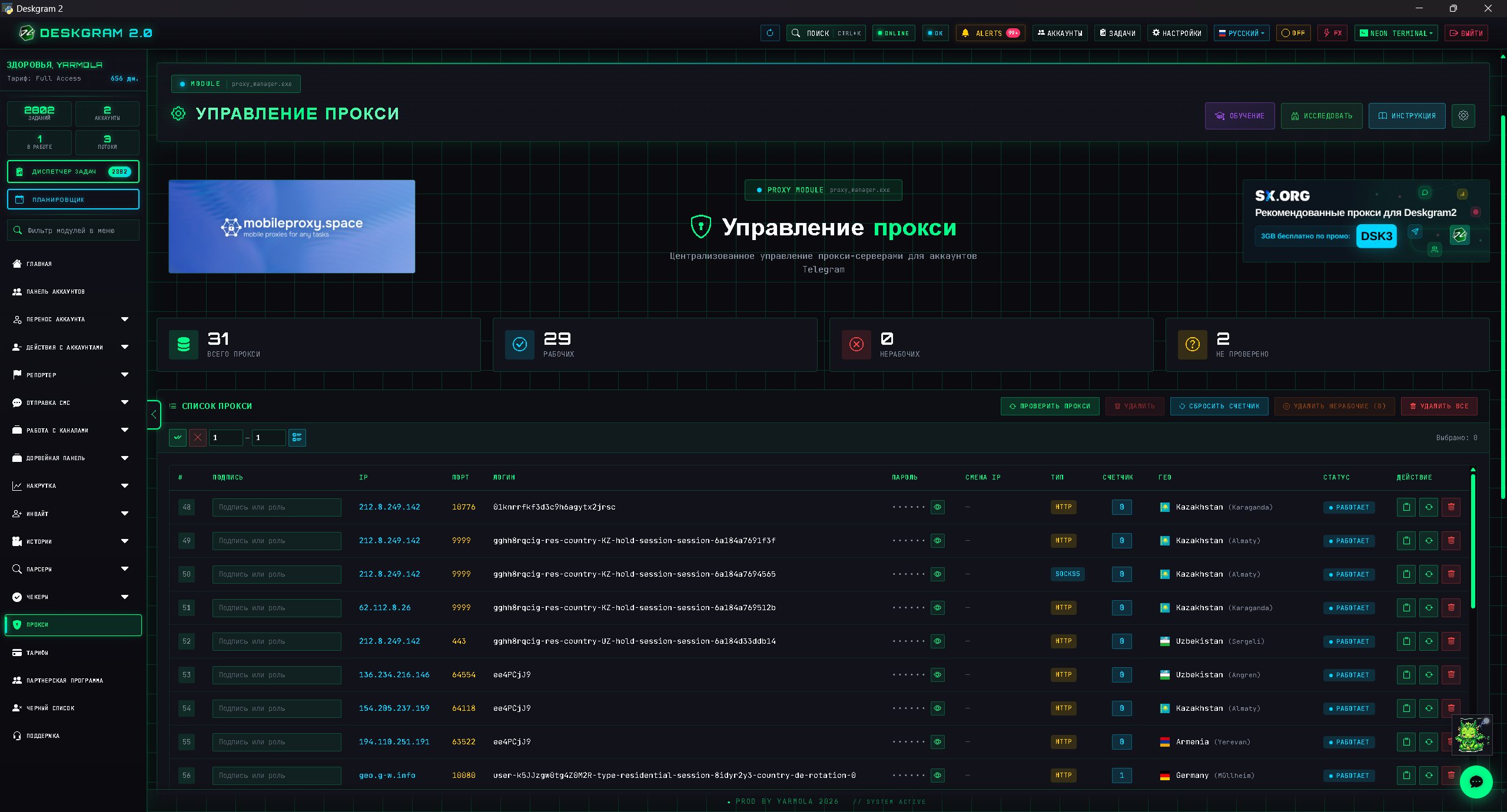
In Deskgram 2, the proxy manager is linked with accounts and other infrastructure modules. That makes it easier to control the network layer before launching tasks.
Useful web previews:
Launch checklist
Before a high-volume Telegram automation launch, check the full bundle:
- Account warming is complete for the selected accounts.
- Proxy rotation is stable and mapped to accounts.
- Telegram API limits are conservative for the first batch.
- The audience segment is clean enough for the task.
- Bulk messaging safety is tested on a small run before scaling.
If one of these layers is weak, changing only the proxy list will not fix the campaign.
Conclusion
Proxies for Telegram automation are not a standalone checkbox. They are part of the stability infrastructure. They should work together with accounts, warm-up, limits, and task control.
If you validate proxies in advance, keep track of the account mapping, and read the error patterns, launches become easier to understand. You quickly see where the weak point is and avoid scaling the same issue across the whole pool.