Creating Telegram Bots: How to Make a Bot Part of Marketing Automation
A Telegram bot should not be created just because “everyone has a bot.” In a marketing system, a bot has a specific role: receive traffic, answer questions, deliver materials, collect leads, qualify interest, or help the user choose the right module.
If that role is not defined, the bot quickly becomes an empty menu. That is why bot creation should begin not with buttons, but with the scenario.
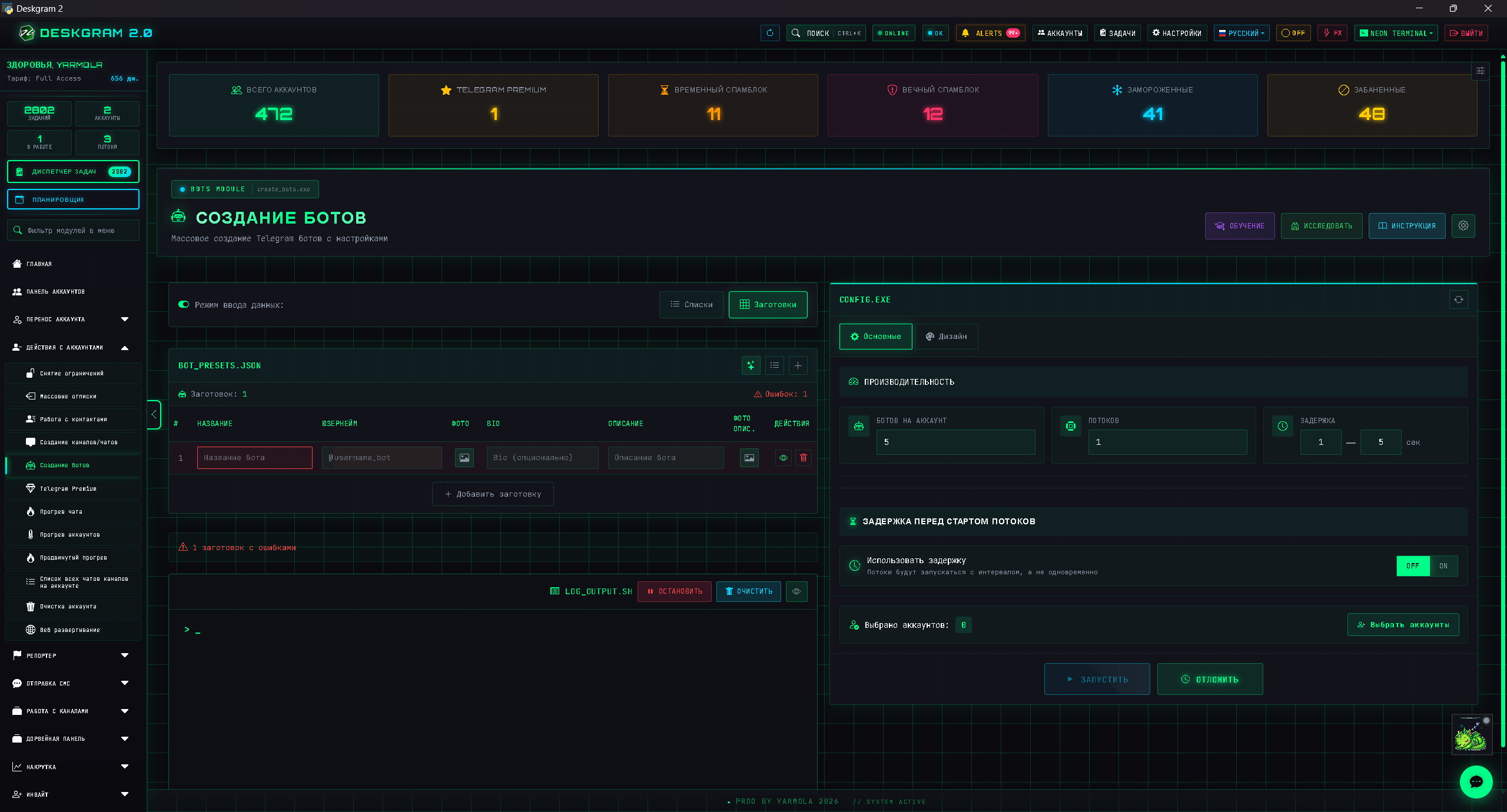
What tasks a bot can solve
A bot can:
- deliver guides;
- route users to web preview;
- collect leads;
- answer common questions;
- segment users;
- gather feedback;
- support a launch;
- hand the user off to a manager;
- connect the site with Telegram.
For Deskgram 2, a bot is especially useful as an intermediate layer between articles, web preview, and buyer intent.
The role of a bot inside the funnel
Users may come from an article, a post, Stories, ads, comments, or direct messages. A bot helps you avoid losing that interest.
Example flow:
- The user reads an article about audience collection.
- They open the module web preview.
- They enter the bot.
- They choose the scenario they care about.
- They receive a link, guide, instruction, or contact.
In this model, the bot is not a separate entity. It becomes a navigation layer inside the product.
What to prepare before building the bot
Before creation, define:
- the target audience;
- the main scenario;
- the list of materials;
- the FAQ;
- web preview transitions;
- human handoff points;
- the language and tone;
- segment tags;
- the return path for the user.
Without this, the bot may be technically functional, but weak from a marketing point of view.
Structure of a simple bot
A basic structure can look like this:
- greeting;
- task selection;
- list of modules;
- web preview link;
- guides;
- FAQ;
- contact with an operator;
- return to the main menu.
There is no need to begin with a complicated architecture. It is usually better to launch a simple, clear scenario and improve it based on real user questions.
How to connect the bot with autoresponders and AI
A bot can work together with autoresponders and neuro-chatting. The autoresponder handles simple repetitive cases, AI helps with freer wording, and the bot provides structure and navigation.
For example, a user asks: “Which module should I use to find channels?” AI can explain the difference between channel search and similar-channel search, while the bot can provide buttons that open the correct web preview.
Example of a Deskgram 2 bot structure
A simple bot can contain branches such as:
- open web preview;
- choose a module by task;
- get a guide;
- ask a question;
- go to the site;
- download the software;
- contact a person.
The branch “choose a module” can guide the user through tasks such as collecting audiences, warming up accounts, messaging, setting AI comments, creating a channel, or publishing Stories.
That makes the bot a product navigator instead of a menu full of random links.
How to use a bot after ads
If ads send traffic only to the site, some users leave without taking any action. A bot helps keep the people who want to ask a question or reach the exact section quickly.
Scenario:
- The user sees an ad or a post.
- They open an article or web preview.
- They open the bot.
- They choose the module they care about.
- They get a guide or a link.
- If needed, they escalate to a human.
The bot closes the gap between interest and a buying action.
What to measure
For a bot, important signals include:
- entries;
- chosen branches;
- clicks to web preview;
- user questions;
- handoffs to humans;
- leads;
- topics where users get lost.
These signals help improve not only the bot, but also the site, articles, FAQ, and product pages.
How to implement a bot gradually
Do not start with a huge bot that has dozens of branches. Begin with a minimum useful version:
- Greeting.
- Task selection.
- Links to key modules.
- Links to guides.
- Human contact.
- Simple transition analytics.
Then inspect the real user questions and add branches based on them. If many people ask about safety, add a branch about account warming, proxies, and Telegram API limits. If many ask about AI, add neuro-commenting and neuro-chatting.
A bot as a localization bridge
When the site has RU, EN, and ZH materials, the bot can help users choose both the language and the scenario. This is especially useful when the user arrives from GitHub, LinkedIn, Reddit, or search.
Instead of forcing the person to find the correct page manually, the bot can provide a short route: language -> task -> module -> guide -> web preview.
Signs of a useful bot
A bot is useful if:
- the user quickly understands what to do;
- the menu is not overloaded;
- links stay current;
- there is a path to web preview;
- there is a path to guides;
- complex questions can be handed to a human;
- user actions are measurable;
- the bot is updated regularly.
If a bot is not updated, it starts causing harm: links age, scenarios no longer match the product, and the user receives broken navigation.
How a bot helps SEO content
An SEO article brings the user from search, but it does not always close the whole question immediately. A bot can become the next step after the article: show the right module, open web preview, suggest a related guide, or accept a question.
That prevents the article from ending in a dead end. It becomes the entry point into a Telegram funnel.
When a bot becomes especially important
A bot is especially valuable when the product has many modules. The user may not understand what they need: audience collection, warm-up, proxies, neuro-commenting, or messaging. The bot helps translate the user’s task into the language of a specific module.
This reduces pressure on support and shortens the path from interest to action. For Deskgram 2, that role is especially useful because the product is broad and users need a fast way to find their module.
A strong bot in such a system works as a navigator, not as a showcase.
Common mistakes
The first mistake is building a bot without a scenario.
The second mistake is overloading the menu.
The third mistake is not updating guide and web preview links.
The fourth mistake is not handing complex questions to a human.
The fifth mistake is not analyzing which buttons people actually press.
Mini-FAQ
Does a bot replace the site?
No. The site handles SEO and long-form materials well. The bot is better for navigation and handling interest inside Telegram.
Should a bot exist before ads launch?
If ads lead into Telegram, then yes, a bot is useful in advance. Otherwise inbound interest is easier to lose.
Can you start with a simple bot?
Yes. A simple bot with a clear scenario is much better than a complex bot with no real logic.
Where Deskgram 2 helps
Useful points:
FAQ
Who is this article for?
This article is for teams that want to use Deskgram 2 for Telegram automation, audience growth, messaging or operational workflows.
Do I need warmed accounts and proxies?
In most bulk Telegram scenarios, warmed accounts, stable proxies, conservative limits and small tests reduce risk before scaling.
Where should I test the workflow?
Use the Deskgram 2 web preview links in the article to understand the module, then start with a small controlled task before launching a larger campaign.
Conclusion
Creating Telegram bots makes sense when the bot is embedded inside marketing automation. It should not merely exist. It should help users move from interest to action: open a guide, inspect web preview, ask a question, or leave a lead.
If the bot is connected to the site, modules, autoresponders, and content, it becomes a strong node inside the Telegram funnel.